

How to fix undo errors in 3dsmax
How to fix undo errors in 3dsmax
Immediately when you ctrl z, 3dsmax error message: “Application Error. An error has occurred and the application will now close. Do you want to attempt to save a copy of the current scene?”
Next a pop-up window will automatically back up. Also, when you exit 3dsmax, you do not choose to save the file, but the file is still saved, this will cause many unintended annoyances.
I use 2 computers, one in the office, one at home, its all fails. This error is caused by a virus, called: “Worm.3d max.alc.clb” . 3ds max ctrl z not working.


How to fix undo errors in 3dsmax
1. For 3dsmax 2015- 2020
Exit 3dsmax and install this Tools from Autodesk: Security Tools
Security Tools File
- Size 1.2 MB
- Version 1.1.0.55
2. For 3dsmax 2014 or lower
1.First , open 3dsmax, go to Maxcript> Runscripts> Select and click on the “PruneScene.mzp”> Open
2.The window pops up, you follow the instructions
3. Select : Next and Next. Then the software is installed. Click on” Run Script”


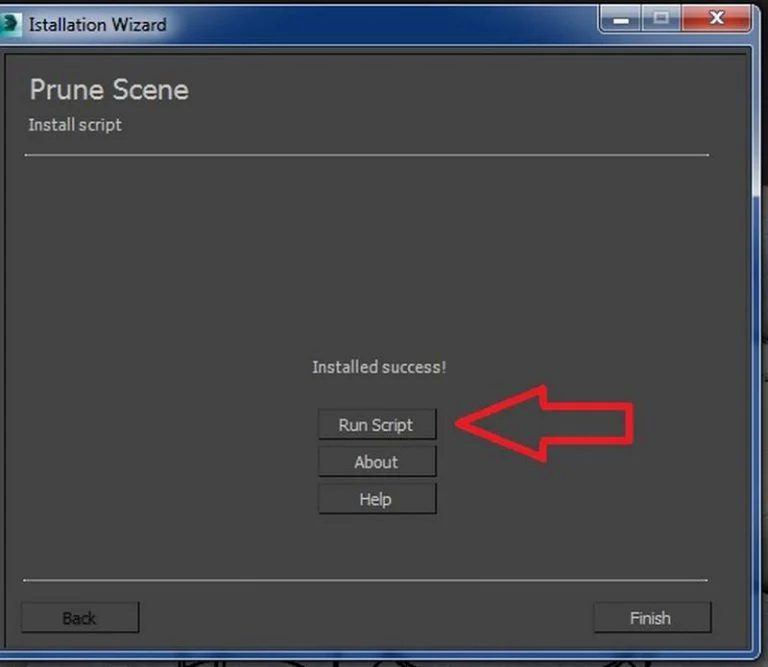
4.Because this is a fee-based software to use all functions, the free version also supports killing this virus. You click the “1” button to turn off the window

5.By this step, you can clean the file by click the “Start ” button.

6. It will have this interface when you see an error

7. Important, to this step, to kill the virus, click the “Protection Disabled” button.

8. There will be a notification ”[Worm.3d max.alc.clb] Virut detected and removed”

9 .Look down, notification “Success. Virutes not detected”

This undo error has been fixed. Download this script here
PruneScene File: size 119 KB
3dzip.info is a trusted platform where designers and 3D enthusiasts can easily access a vast collection of high-quality 3D models for 3ds Max. From interiors and exteriors to architectural elements, decorative items, electronics, and even specialized collections for spaces like living rooms, bedrooms, kitchens, offices, or coffee shops—everything you need is just a few clicks away. Each model is carefully crafted with precise details, accurate scale, and easy customization, ensuring full compatibility with popular versions of 3ds Max.
What makes 3dzip.info stand out is its seamless integration with V-Ray and Corona Renderer materials, allowing you to achieve realistic, vibrant, and professional-quality renders. This not only saves valuable modeling time but also elevates the final presentation of your projects. Plus, the library is regularly updated to reflect the latest design trends, offering styles that range from classic and contemporary to modern minimalism.
If you believe that any model or resource published on this website may infringe your copyright or intellectual property rights, please contact us immediately at [email protected] for prompt review and removal.
hi
the download link : https://drive.google.com/u/0/uc?id=1b4e98v1J2Ar8m_NWyMkT2AOCK9FhaF4F&export=download
have problem & error 404 ( not found )
tnx for recheck
Fixed,
Please re-download.
Have a good day!